Swing coach, hands-free

Your swing coach in your golf bag.

Lean your phone against your bag and swing. What A Shot records on its own, tracks 33 body points on the phone and tells you the one thing to work on next, with the drill that fixes it. Hitting a ball? It estimates ball speed, launch and carry too.

Two sessions freeAndroid 12+No ball or club needed

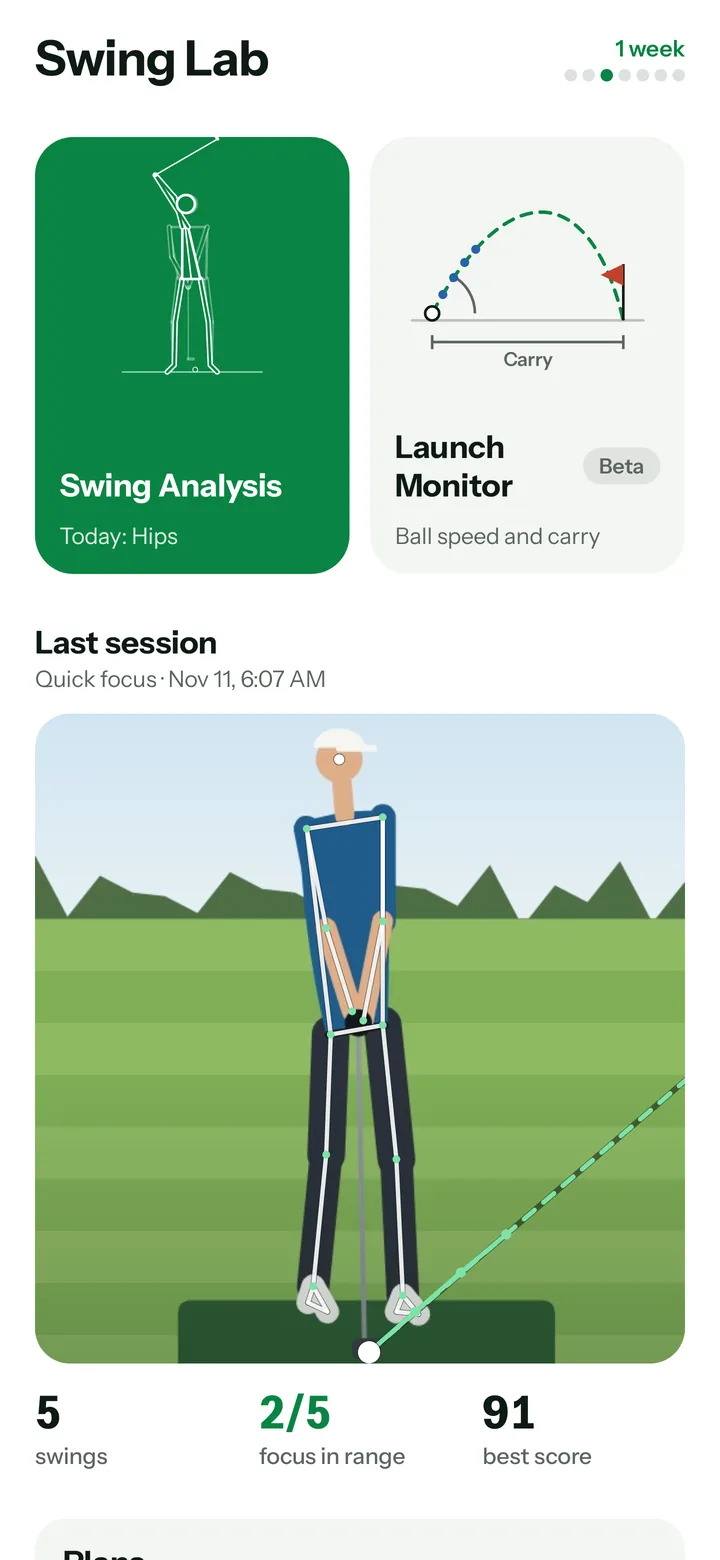
What A Shot practice tab: the green start for the swing coach, the launch monitor beside it, and the last session as a swing card with the impact frame.
Ball speed230km/hmeasured
Launch12.4°measured
Carry216mestimate

Three ways to train

One app for the range, the course and your living room.

Launch Monitor · beta

Ball data without the hardware.

Set your phone down, hit, and What A Shot follows the ball through the first frames after impact. A first estimate of the numbers you would otherwise need a launch monitor for.

  • Ball speed and launch angle estimated from 240 fps video
  • Carry, apex and flight path from a ball-flight model set up for each club
  • Club speed estimate and a trajectory chart for every shot

Requires a phone that records 240 fps. Spin and side direction can't be measured from the front view.
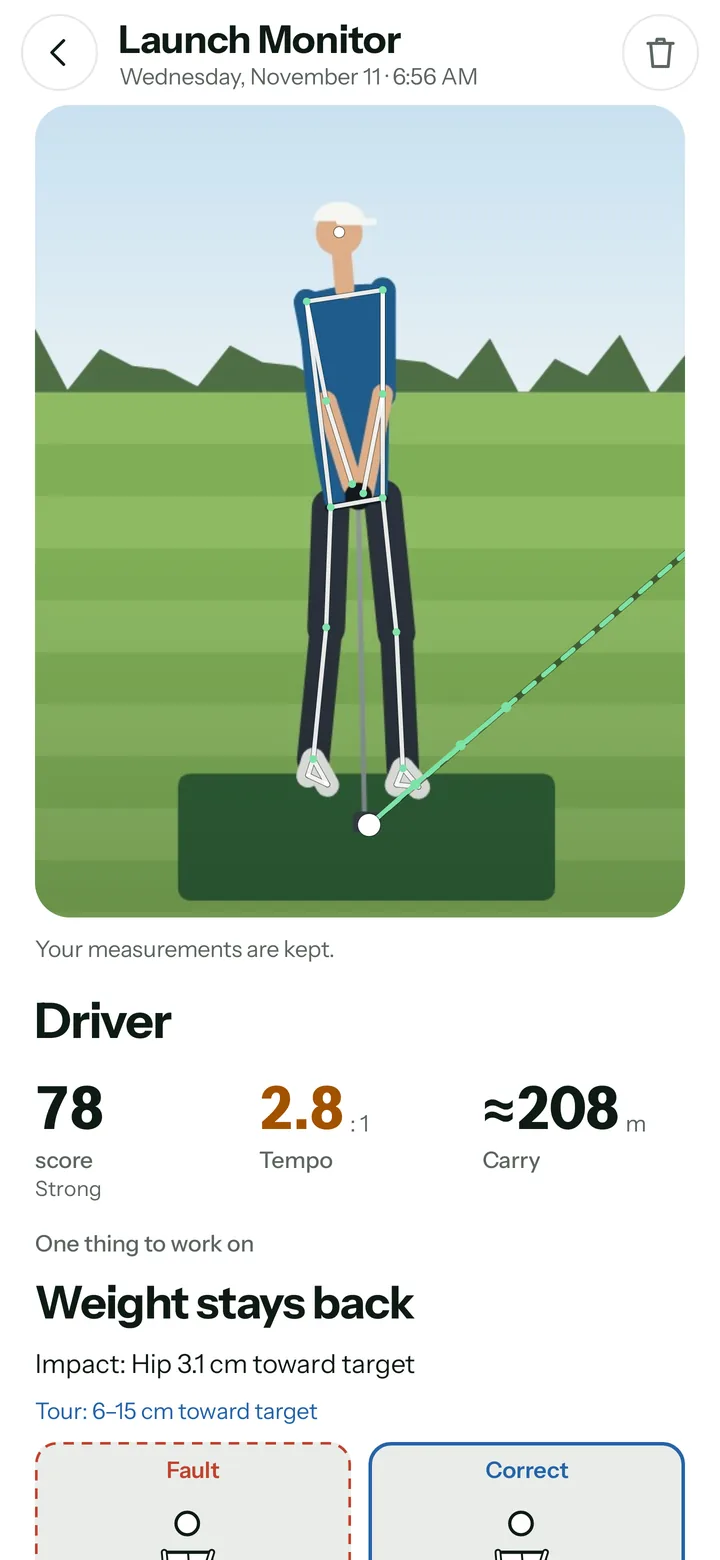
Shot screen of a driver swing: the impact frame with the skeleton and the ball's path, then score, tempo and estimated carry.

Swing Analysis

See what your body really does.

On-device pose tracking finds address, top, impact and finish on its own and measures each one against tour ranges, in centimeters and degrees.

  • Hip and head shift, spine tilt, hand position and stance width
  • Tempo ratio with backswing and downswing time
  • The one thing to work on first, with the other faults folded underneath
  • Replay with skeleton overlay that jumps to every checkpoint
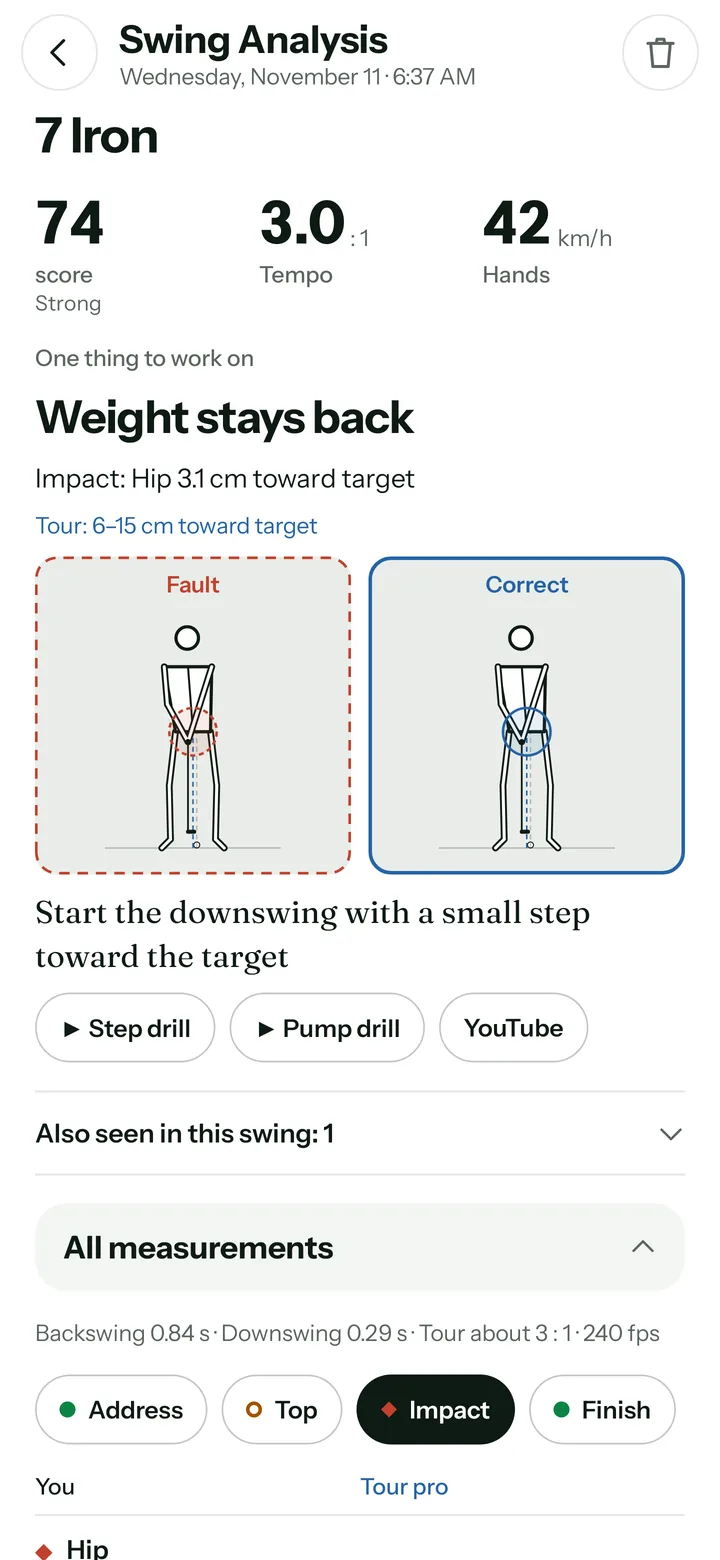
All measurements of a swing: timing and the checkpoints for hip shift, head movement and spine tilt against tour ranges.

Mirror Mode

Live feedback while you rehearse.

Use the front camera like a smart mirror. What A Shot captures your address position and shows a head box and hip line, so you see sway and lift the moment they happen.

  • Framing check for distance, feet and position in the picture
  • Live head and hip tracking against your own address
  • Practice drills at home, no ball needed
Live · Mirror Hip Head 0.4 cm Hip 1.1 cm

Your coach in the app

From fault to fix.

Data alone doesn't lower your score. What A Shot tells you what to work on first and shows you how.

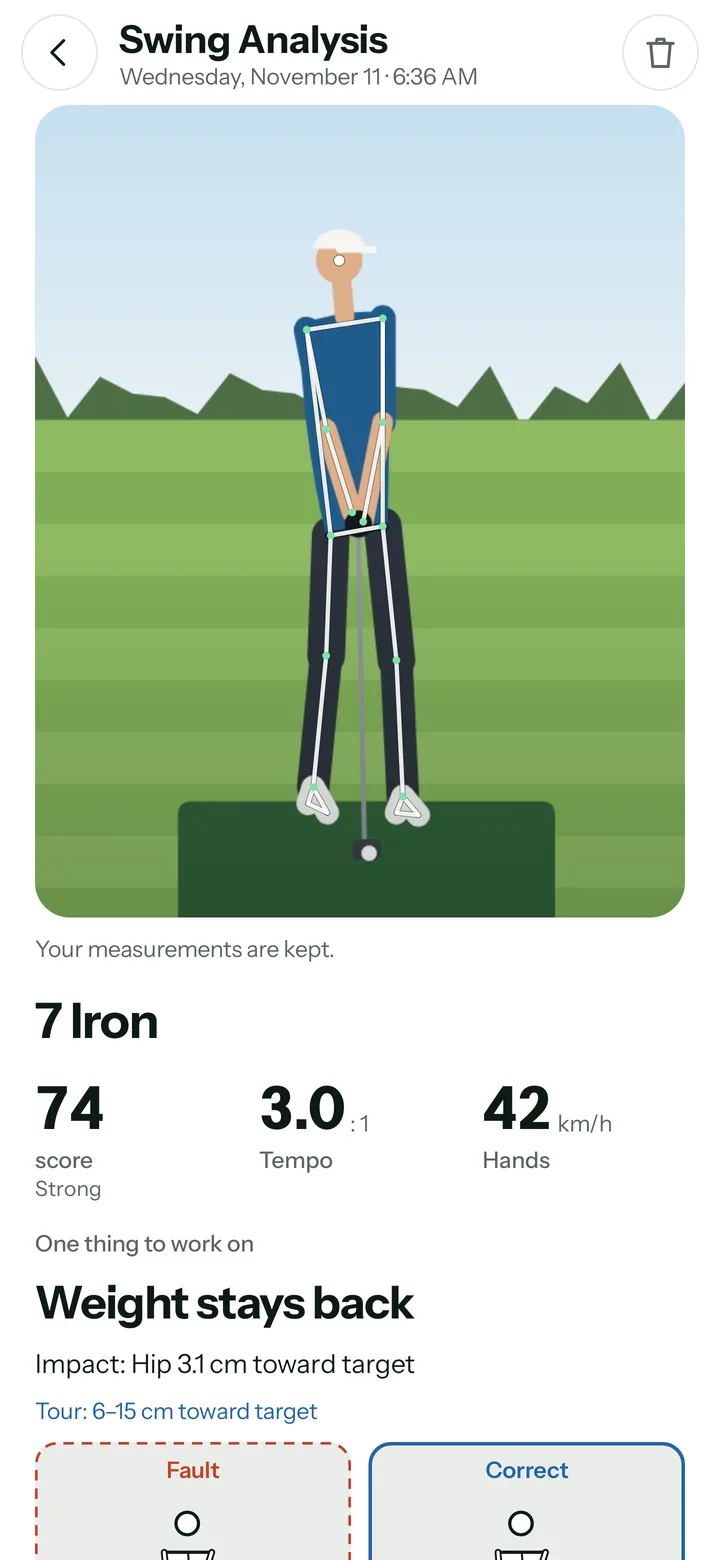
  1. Shot screen with the one thing to work on: the fault dashed in red next to the fix in blue.

    Detect

    Every analysis checks common faults you can see from the front, from sway to a hanging-back finish, and gives you the one to work on first. The rest wait their turn.

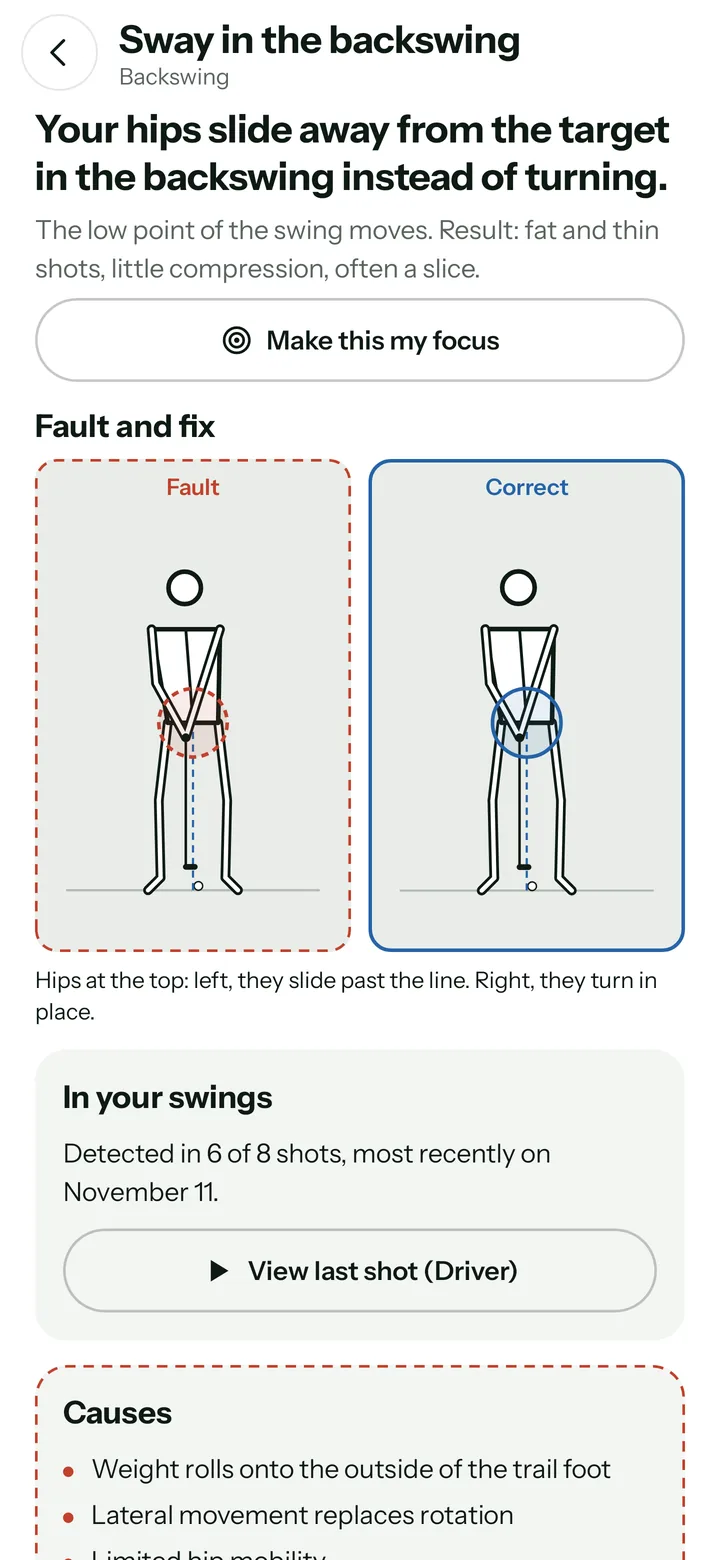
  2. Fault page with an animated side-by-side of the fault and the correct move.

    Understand

    Each fault explains what happens, what it does to the ball and what usually causes it, with an animated side-by-side of fault and fix.

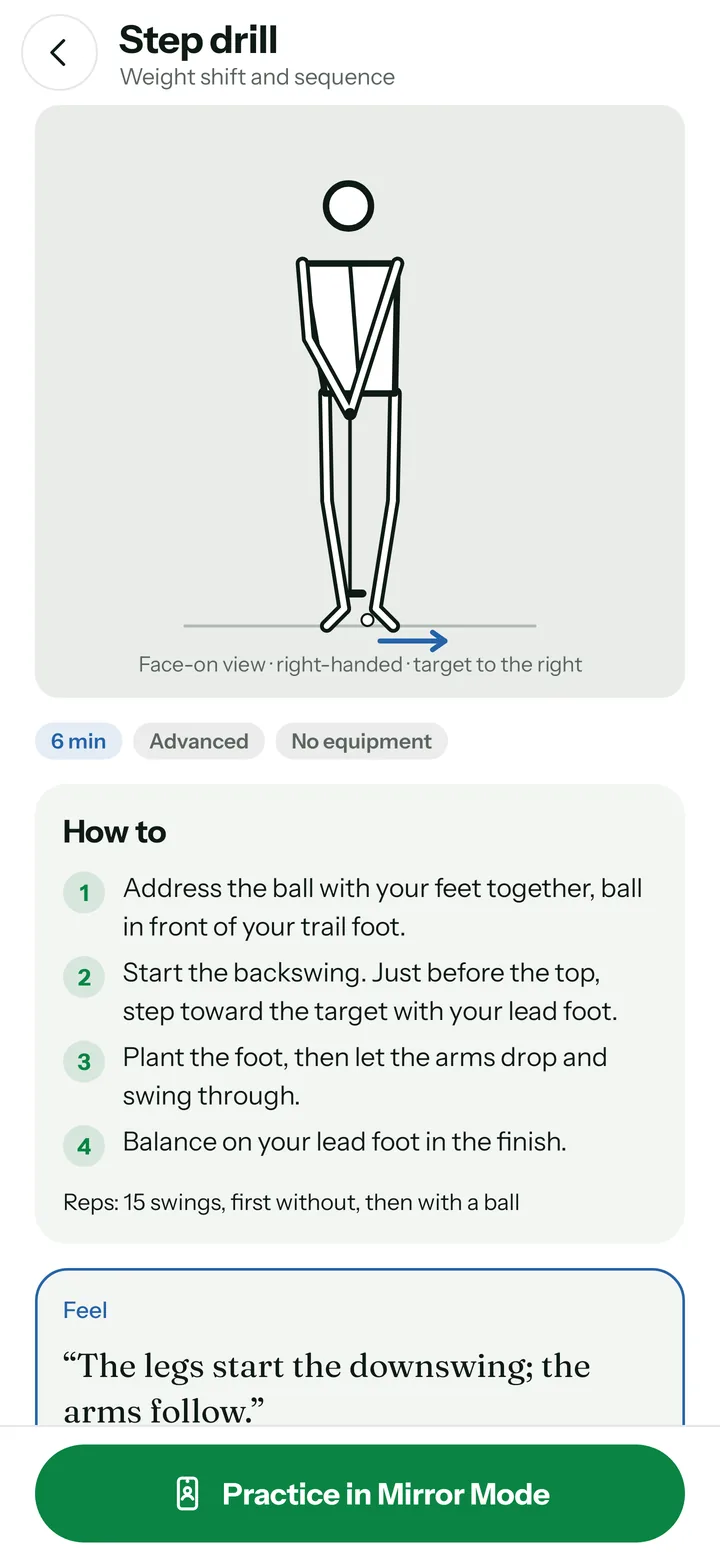
  3. Step drill with an animated figure, steps and a feel cue.

    Fix

    Step-by-step drills with a feel cue, the usual mistakes and how What A Shot measures your progress. Video lessons are one tap away.

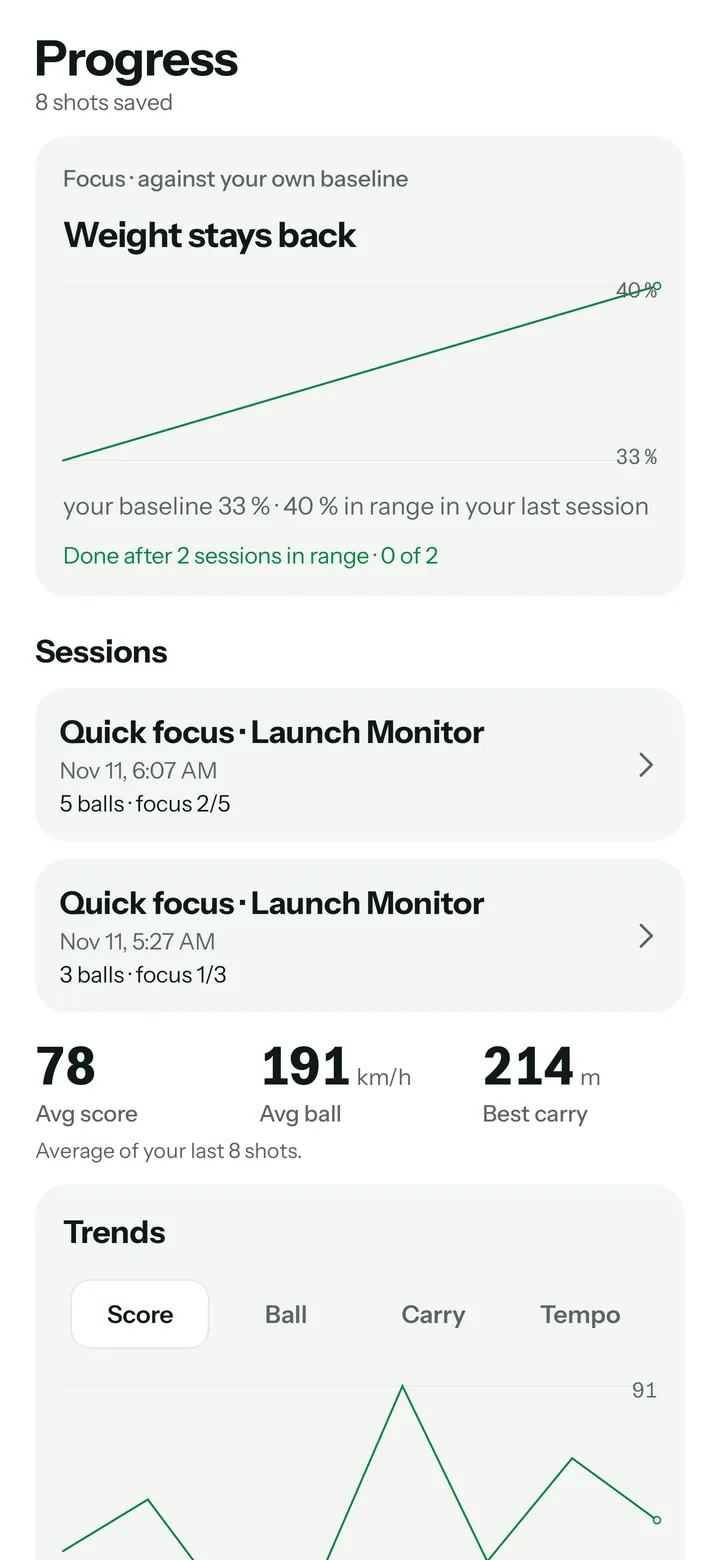
  4. History with score and ball speed trends, top faults and stats per club.

    Track

    Your history shows trends per club and the faults that keep coming back, so you know when a fix has stuck.

How it works

Set up once. Then just hit.

  1. Set up

    Place your phone about 3 m in front of you at hip height, facing you. No tripod needed: lean it against your golf bag.

  2. Swing

    Tap Start and swing. Recording starts when you settle at address and stops after your follow-through, and a few seconds later you see and hear the result, like “Hips good. 142 metres.” No buttons, no walking back to the phone.

  3. Review

    After every block you see what your focus did to the ball, for example how much carry you lose when your hips slide, and a cue for the next five balls.

Target Phone at hip height You, facing the phone ≈ 3 m
Face-on view: the phone looks straight at your chest. Right-handed golfers have the target on the right side of the picture.

How it measures

Honest about what a phone can see.

On your phone

Video capture, pose tracking and ball measurement all run on the device. Your swings are never uploaded.

Flags its own doubts

When your body is hidden, the frame rate is too low or the ball was only visible in a frame or two, the shot is marked as a low-confidence measurement.

Checked on every build

Every build runs an automated check of the analysis on simulated swings, so a change can't quietly make it worse. Tests against real swings and a reference launch monitor come next; until then ball data is marked beta.

What a front view can't see

Spin and side direction can't be measured face-on. Carry and club speed are estimates based on the typical spin and smash factor of your club. Swing plane needs a camera behind you, down the target line.

Pricing

Start free. Upgrade when it clicks.

Your first two practice sessions are on us, with every feature switched on. Then try What A Shot Pro free for a week.

Free

€0No card needed

  • Two practice sessions with every feature
  • Fault library, drills and tempo trainer
  • No account needed
Start free
Recommended

What A Shot Pro

Monthly or yearlyLaunch pricing will be announced soon.

  • Unlimited swing and ball analyses
  • All three training modes in every session
  • Full history with trends per club
Get Pro

FAQ

Questions, answered.

Which phones are supported?

What A Shot runs on 64-bit Android phones with Android 12 or newer. Ball data needs a camera that can record 240 fps for apps, such as the one in the Pixel 9 Pro. What A Shot checks your camera on first start; without 240 fps you still get the full swing analysis at 120 or 60 fps.

Is there an iPhone version?

Not yet. Android comes first. The analysis engine is built so that an iPhone app can share it later.

How accurate is it?

The body measurements come from 2D pose tracking and work best face-on, about 3 m away, at hip height. Ball speed and launch angle are estimated from the 240 fps video and are still in beta: they have not yet been compared with a reference launch monitor. Carry is a physics estimate that uses typical spin for your club, and every shot shows when a measurement is less certain.

Are my videos uploaded?

No. Analysis runs on your phone and your videos stay there. You can export a shot yourself if you want to share it.

What do I need besides my phone?

Something to stand the phone on at hip height, about 3 m in front of you: a small tripod, or simply your golf bag. No sensors, no stickers, no extra hardware.

Do I need a ball or even a club?

No. Without a ball you get the full swing analysis; with one you also get ball speed, launch and carry. You can swing a club, a stick or nothing at all, indoors or on the range.

Does it work for left-handed golfers?

Yes. Set your swing hand in the profile and every measurement and target direction follows.

Can I analyze videos I already have?

Yes. Import a slow-motion video from your camera app; What A Shot detects the slow-motion factor automatically.

What does it cost?

Your first two practice sessions are free, and you can try What A Shot Pro free for a week. After that, Pro is a monthly or yearly subscription. Pricing will be announced at launch.

Make your next range session count.

Ball data, swing faults and the drills to fix them, from the phone you already own.

Start free

Almost there

What A Shot launches soon.

Checkout opens right here at launch. Android comes first.